
Vanna 是一个基于 MIT 许可的开源 Python RAG(检索增强生成)框架,用于 SQL 生成和相关功能。它允许用户在数据上训练一个 RAG “模型”,然后提问问题,这将生成在数据库上运行的 SQL 查询语句,并将查询结果通过表格和图表的方式展示给用户。详细介绍参考博客 ↗
安装Mysql#
我是用的是云容器,所以安装mysql稍微比较麻烦,如果是在本地,可以直接拉取mysql的镜像。下面介绍云容器安装mysql的过程: 安装mysql服务器
apt update
apt install mysql-server这里我选择将mysql文件夹设置在我的mysql_data目录下并赋予权限:
sudo mkdir -p /root/shared-nvme/LLM-Learning/vanna/mysql_data
sudo chown mysql:mysql /root/shared-nvme/LLM-Learning/vanna/mysql_data
sudo chmod 750 /root/shared-nvme/LLM-Learning/vanna/mysql_data初始化mysql 这里跳过了密码生成:
sudo -u mysql mysqld --initialize-insecure --datadir=/root/shared-nvme/LLM-Learning/vanna/mysql_data启动mysql服务
sudo -u mysql /usr/sbin/mysqld \
  --datadir=/root/shared-nvme/LLM-Learning/vanna/mysql_data \
  --port=3306 \
  --socket=/root/shared-nvme/LLM-Learning/vanna/mysql_data/mysql.sock \
--log-error=/root/shared-nvme/LLM-Learning/vanna/mysql_data/mysql.err &检查端口
netstat -tlnp | grep 3306
## tcp 0 0 127.0.0.1:3306 0.0.0.0:* LISTEN 65113/mysqld 可以看到3306端口正在被mysqd监听,说明服务启动成功。
连接mysql并设置密码
-- 连接到 MySQL
mysql -u root -h 127.0.0.1 -P 3306

-- 设置 root 密码
ALTER USER 'root'@'localhost' IDENTIFIED BY 'your_root_password';

-- 刷新权限
FLUSH PRIVILEGES;

-- 退出
EXIT;设置密码后续连接mysql使用:
mysql -u root -p -h 127.0.0.1 -P 3306
-- 创建demo数据库
create database demo;
-- 使用数据库
use demo;
-- 创建表
CREATE TABLE IF NOT EXISTS user (
        id INT PRIMARY KEY COMMENT '用户ID' ,
        name VARCHAR(100) COMMENT '姓名',
        age INT COMMENT '年龄'
    ) COMMENT '用户信息表';

insert into user values(1,'迷糊老师',34),(2,'菲菲公主',36),(3,'小呆呆',24),(4,'小猪猪',21),(5,'超人强',18);构建Vanna#
首先自定义一个LLM,这里通过dashscope 使用云端的大模型,也可以使用本地的大模型(挖个坑后续补充):
import random
from vanna.base import VannaBase
from vanna.chromadb import ChromaDB_VectorStore
from dashscope import Generation

DEBUG_INFO=None

class QwenLLM(VannaBase):
  def __init__(self,config=None):
    self.model=config['model']
    self.api_key=config['api_key']

  def system_message(self,message: str):
    return {'role':'system','content':message}

  def user_message(self, message: str):
    return {'role':'user','content':message}

  def assistant_message(self, message: str):
    return {'role':'assistant','content':message}

  def submit_prompt(self,prompt,**kwargs):
    resp=Generation.call(
      model=self.model,
      messages=prompt,
      seed=random.randint(1, 10000),
      result_format='message',
      api_key=self.api_key)
    answer=resp.output.choices[0].message.content
    global DEBUG_INFO
    DEBUG_INFO=(prompt,answer)
return answer构建Vanna客户端:
class MyVanna(ChromaDB_VectorStore,QwenLLM):
    def __init__(self, config=None):
        ChromaDB_VectorStore.__init__(self,config=config)
QwenLLM.__init__(self,config=config)构造向量库:
vn.connect_to_mysql(host='localhost',dbname='demo',user='root',password='123456',port=3306)这段代码是建立 Vanna 客户端与 MySQL 数据库的连接。
将DDL存储到向量库中:
DDL='''CREATE TABLE IF NOT EXISTS user (
        id INT PRIMARY KEY COMMENT '用户ID' ,
        name VARCHAR(100) COMMENT '姓名',
        age INT COMMENT '年龄'
    ) COMMENT '用户信息表';
'''
vn.train(ddl=DDL)这里需要介绍一下vanna的train和ask方法:
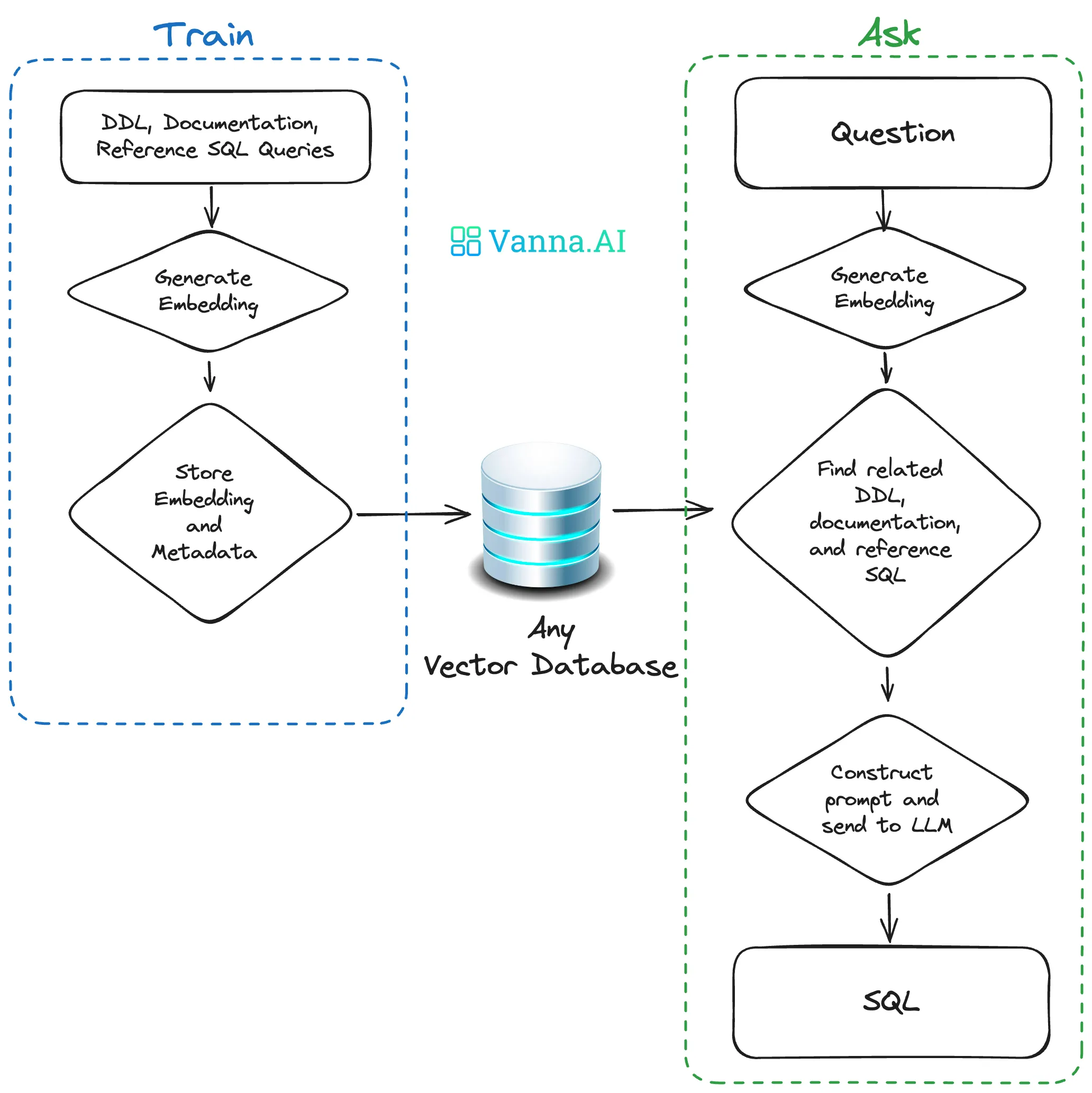 其中train就是往向量库里存放内容,ask就是根据问题向向量库区取内容构建sql语句。
运行vn.train(ddl=DDL)之后会出现:
/root/.cache/chroma/onnx_models/all-MiniLM-L6-v2/onnx.tar.gz这表示ChromaDB 正在自动下载一个名为 all-MiniLM-L6-v2 的 ONNX 格式的嵌入模型(embedding model)。ChromaDB 是一个向量数据库,默认使用 sentence-transformers 模型 将文本转换为向量(embeddings)。第一次使用 ChromaDB 且没有指定自定义 embedding function 时,它会自动下载默认模型。
存储DDL到向量库:
DDL='''CREATE TABLE IF NOT EXISTS user (
        id INT PRIMARY KEY COMMENT '用户ID' ,
        name VARCHAR(100) COMMENT '姓名',
        age INT COMMENT '年龄'
    ) COMMENT '用户信息表';
'''

## 存储DDL到向量库
vn.train(ddl=DDL)返回:
## Adding ddl: CREATE TABLE IF NOT EXISTS user (
##         id INT PRIMARY KEY COMMENT '用户ID' ,
##         name VARCHAR(100) COMMENT '姓名',
##         age INT COMMENT '年龄'
##     ) COMMENT '用户信息表';
## 'ab0ac208-2f5e-50b0-9177-423427220940-ddl'其中'ab0ac208-2f5e-50b0-9177-423427220940-ddl'是 Vanna 在内部用于标识和管理元数据(比如 DDL 语句)的一个 唯一键(key)。对 Vanna 内部的元数据管理和去重、更新、追踪来源等非常有用。
同样的,存储document到向量库:
## 存储document到向量库
vn.train(documentation='"福报"是指age>=35岁,也就是可以向社会输送的人才')document经常用来存储行业内部的话术,方便模型理解,返回:
## Adding documentation....
## '8fc54ebe-8bb3-5fb7-88a6-5c98d817ed07-doc'再存储SQL到向量库:
## 存储SQL到向量库
'''
1,通过LLM根据SQL构造一个question
2,按question-SQL的JSON入库
            {
                "question": question,
                "sql": sql,
            }
'''

vn.train(sql='select name from user where age between 10 and 20')模型会根据问题生成一个question:
## Question generated with sql: Who are the users aged between 10 and 20?
## Adding SQL...
## '04a88b26-6984-5521-b897-73798ce0001f-sql'可以看到生成了问题:Who are the users aged between 10 and 20?
我们在前面构建QwenLLM模型时,设置了全局变量DEBUG_INFO,现在我们来打印看上面这个过程发生了什么:
Q,A=DEBUG_INFO
print('PROMPT:',Q[0]['content'])
print('ANSWER:',A)返回:
PROMPT: The user will give you SQL and you will try to guess what the business question this query is answering. Return just the question without any additional explanation. Do not reference the table name in the question.
ANSWER: Who are the users aged between 10 and 20?看看Q的整体结构:
PROMPT: [{'role': 'system', 'content': 'The user will give you SQL and you will try to guess what the business question this query is answering. Return just the question without any additional explanation. Do not reference the table name in the question.'}, {'role': 'user', 'content': 'select name from user where age between 10 and 20'}]
ANSWER: What are the names of users whose age is between 10 and 20?接下来存储question-SQL到向量库:
## 存储question-SQL到向量库
'''
按question-SQL的JSON入库
            {
                "question": question,
                "sql": sql,
            }
'''
vn.train(question='小猪猪的年龄',sql='select age from user where name="小猪猪"')返回:
## '0189b3e3-c135-5bfe-a9f8-7faabd751813-sql'查看所有入库的知识:
## 检查所有入库的知识
vn.get_training_data()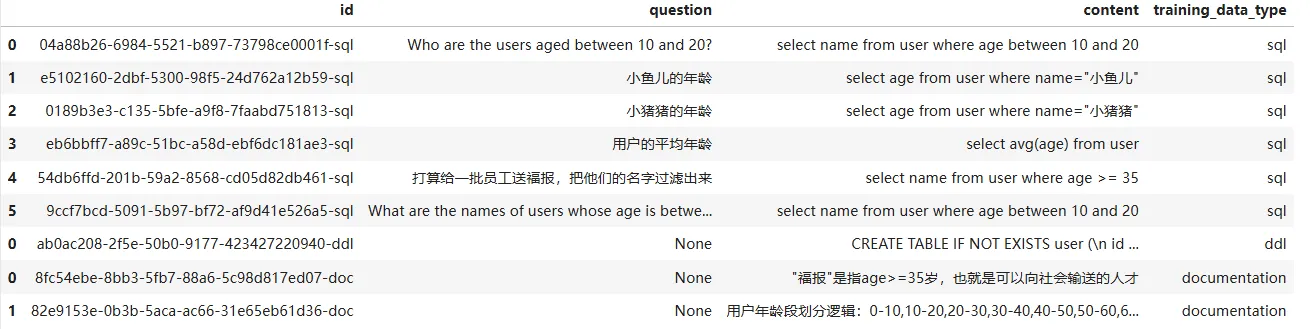
开始查询#
前面我们已经向向量库中输入了很多知识,接下来开始查询: 首先试试根据问题生成SQL语句:
## 基本使用
result=vn.generate_sql('用户的平均年龄')
print('SQL:',result)

Q,A=DEBUG_INFO
print('PROMPT:',Q[0]['content'])
print('ANSWER:',A)输出:
select avg(age) from user
SQL: select avg(age) from user
PROMPT: You are a SQL expert.
===Tables
CREATE TABLE IF NOT EXISTS user (
        id INT PRIMARY KEY COMMENT '用户ID' ,
        name VARCHAR(100) COMMENT '姓名',
        age INT COMMENT '年龄'
    ) COMMENT '用户信息表';


===Additional Context

用户年龄段划分逻辑:0-10,10-20,20-30,30-40,40-50,50-60,60-70,70-80...左闭右开区间

"福报"是指age>=35岁,也就是可以向社会输送的人才

===Response Guidelines
1. If the provided context is sufficient, please generate a valid SQL query without any explanations for the question.
2. If the provided context is almost sufficient but requires knowledge of a specific string in a particular column, please generate an intermediate SQL query to find the distinct strings in that column. Prepend the query with a comment saying intermediate_sql
3. If the provided context is insufficient, please explain why it can't be generated.
4. Please use the most relevant table(s).
5. If the question has been asked and answered before, please repeat the answer exactly as it was given before.

ANSWER: select avg(age) from user可以看到模型使用了之前传入的Additional Context 生成了正确的SQL语句 ANSWER: select avg(age) from user。实际上在这个过程中完整的对话应该如下:
[{'role': 'system', 'content': 'You are a SQL expert. \n===Tables \nCREATE TABLE IF NOT EXISTS user (\n id INT PRIMARY KEY COMMENT \'用户ID\' ,\n name VARCHAR(100) COMMENT \'姓名\',\n age INT COMMENT \'年龄\'\n ) COMMENT \'用户信息表\';\n\n\n\n===Additional Context \n\n"福报"是指age>=35岁,也就是可以向社会输送的人才\n\n===Response Guidelines \n1. If the provided context is sufficient, please generate a valid SQL query without any explanations for the question. \n2. If the provided context is almost sufficient but requires knowledge of a specific string in a particular column, please generate an intermediate SQL query to find the distinct strings in that column. Prepend the query with a comment saying intermediate_sql \n3. If the provided context is insufficient, please explain why it can\'t be generated. \n4. Please use the most relevant table(s). \n5. If the question has been asked and answered before, please repeat the answer exactly as it was given before. \n'}, {'role': 'user', 'content': '小鱼儿的年龄'}, {'role': 'assistant', 'content': 'select age from user where name="小鱼儿"'}, {'role': 'user', 'content': '小猪猪的年龄'}, {'role': 'assistant', 'content': 'select age from user where name="小猪猪"'}, {'role': 'user', 'content': '用户的平均年龄'}, {'role': 'assistant', 'content': 'select avg(age) from user'}, {'role': 'user', 'content': 'Who are the users aged between 10 and 20?'}, {'role': 'assistant', 'content': 'select name from user where age between 10 and 20'}, {'role': 'user', 'content': '打算给一批员工送福报,把他们的名字过滤出来'}]模型会在后面将一些优秀的问答对传递给模型,例如{'role': 'user', 'content': '小猪猪的年龄'}, {'role': 'assistant', 'content': 'select age from user where name="小猪猪"'},使得模型能够理解并给出优秀的回答。这也就是论文中提到的第三种策略Contextual:
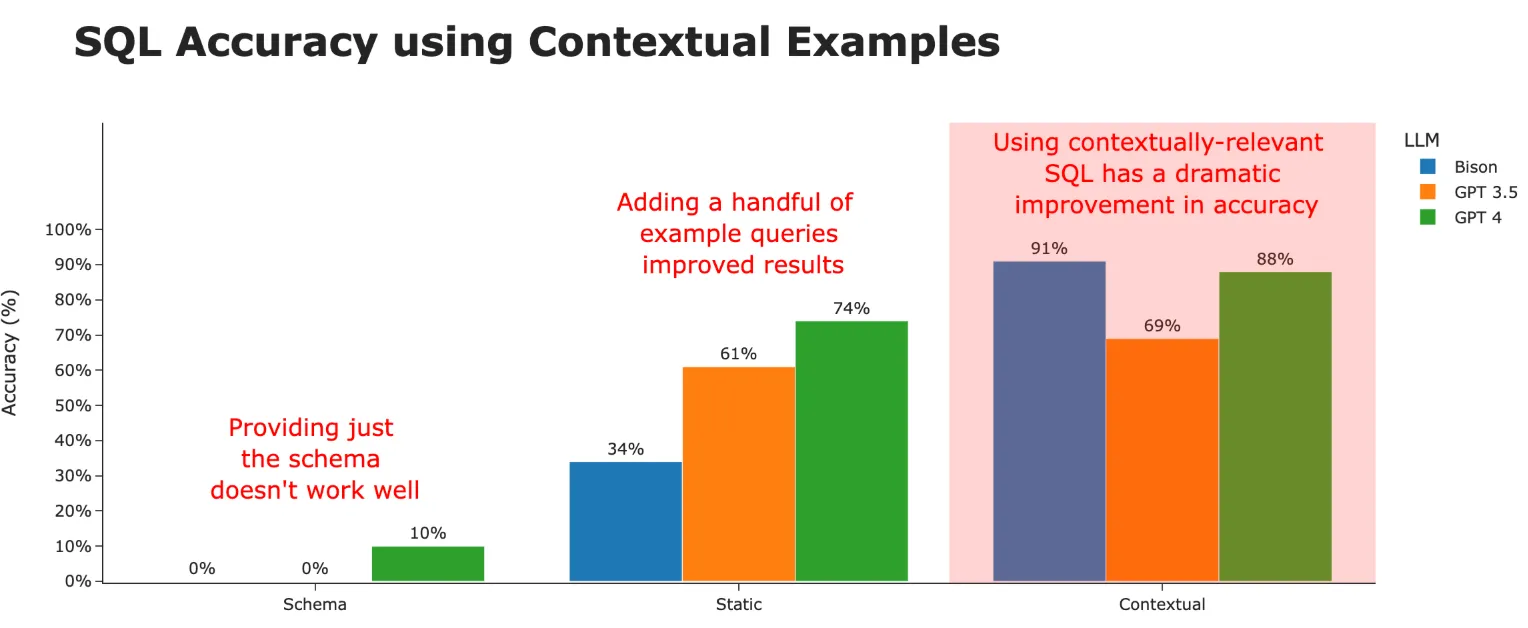 使用文本相关的
question-sql对,作为历史会话,从而提升模型效果。
接下来直接向vanna提问,让它直接给出使用SQL语句执行后的结果:
vn.ask('用户的平均年龄')回答:
## ('select avg(age) from user',
##   avg(age)
##  0  26.6000,
## None)同样的,我们看看模型的思考过程:
[{'role': 'system', 'content': 'You are a SQL expert. \n===Tables \nCREATE TABLE IF NOT EXISTS user (\n id INT PRIMARY KEY COMMENT \'用户ID\' ,\n name VARCHAR(100) COMMENT \'姓名\',\n age INT COMMENT \'年龄\'\n ) COMMENT \'用户信息表\';\n\n\n\n===Additional Context \n\n"福报"是指age>=35岁,也就是可以向社会输送的人才\n\n===Response Guidelines \n1. If the provided context is sufficient, please generate a valid SQL query without any explanations for the question. \n2. If the provided context is almost sufficient but requires knowledge of a specific string in a particular column, please generate an intermediate SQL query to find the distinct strings in that column. Prepend the query with a comment saying intermediate_sql \n3. If the provided context is insufficient, please explain why it can\'t be generated. \n4. Please use the most relevant table(s). \n5. If the question has been asked and answered before, please repeat the answer exactly as it was given before. \n'}, {'role': 'user', 'content': '小鱼儿的年龄'}, {'role': 'assistant', 'content': 'select age from user where name="小鱼儿"'}, {'role': 'user', 'content': '小猪猪的年龄'}, {'role': 'assistant', 'content': 'select age from user where name="小猪猪"'}, {'role': 'user', 'content': 'Who are the users aged between 10 and 20?'}, {'role': 'assistant', 'content': 'select name from user where age between 10 and 20'}, {'role': 'user', 'content': '用户的平均年龄'}]它会将年龄相关的question-sql对,作为历史会话,从而提升模型效果。
数据库里users表里的内容如下,年龄均值正好是26.6岁:
+----+--------------+------+
| id | name         | age  |
+----+--------------+------+
|  1 | 迷糊老师     |   34 |
|  2 | 菲菲公主     |   36 |
|  3 | 小呆呆       |   24 |
|  4 | 小猪猪       |   21 |
|  5 | 超人强       |   18 |
+----+--------------+------+再提问一个:
vn.ask('打算给一批员工送福报,把他们的名字过滤出来')输出:
select name from user where age >= 35    name
0 菲菲公主好了,可怜的菲菲公主即将收到福报。
在Vanna中执行ask后会生成图表,看看它的逻辑:
Q,A=DEBUG_INFO
print('PROMPT:',Q[0]['content'])
print('ANSWER:',A)回答:
PROMPT: The following is a pandas DataFrame that contains the results of the query that answers the question the user asked: '各个年龄段的人数都是多少?'

The DataFrame was produced using this query: SELECT
    CASE
        WHEN age BETWEEN 0 AND 10 THEN '0-10'
        WHEN age BETWEEN 10 AND 20 THEN '10-20'
        WHEN age BETWEEN 20 AND 30 THEN '20-30'
        WHEN age BETWEEN 30 AND 40 THEN '30-40'
        WHEN age BETWEEN 40 AND 50 THEN '40-50'
        WHEN age BETWEEN 50 AND 60 THEN '50-60'
        WHEN age BETWEEN 60 AND 70 THEN '60-70'
        WHEN age BETWEEN 70 AND 80 THEN '70-80'
        ELSE '80+'
    END AS age_group,
    COUNT(*) AS count
FROM user
GROUP BY age_group;

The following is information about the resulting pandas DataFrame 'df':
Running df.dtypes gives:
 age_group    object
count         int64
dtype: object
ANSWER: ```python
import plotly.express as px
import plotly.graph_objects as go

if len(df) == 1:
    fig = go.Figure(go.Indicator(
        mode = "number",
        value = df['count'].values[0],
        title = {"text": f"Age Group: {df['age_group'].values[0]}<br>Count"}))
else:
    fig = px.bar(df, x='age_group', y='count', title='Number of People in Each Age Group')
fig.show()它会将我们的问题和生成的SQL语句传入给大模型,再生成表格的代码。